μ-link ties your μ-series standalone apps together. Run μ-clid, μ-tant, μ-toni and μ-on side by side and μ-link sums their audio to one output, keeps them all on one sample-accurate clock, and gives you a live mixer to balance them. You don't need a DAW.
Master clockPerformance mixerScenesDesktop app, not a plug-inWindows
Running two standalone apps normally means two audio connections and two clocks that drift apart. μ-link owns the one sound card output. The apps send it their audio, and it is the single clock they all follow.
One master clock
Play and stop the whole rig together. The tempo runs from 20 to 300 BPM in steps of a tenth. It comes from the sound card, so every app stays in step with no drift, however long you play.
Clock
A live mixer
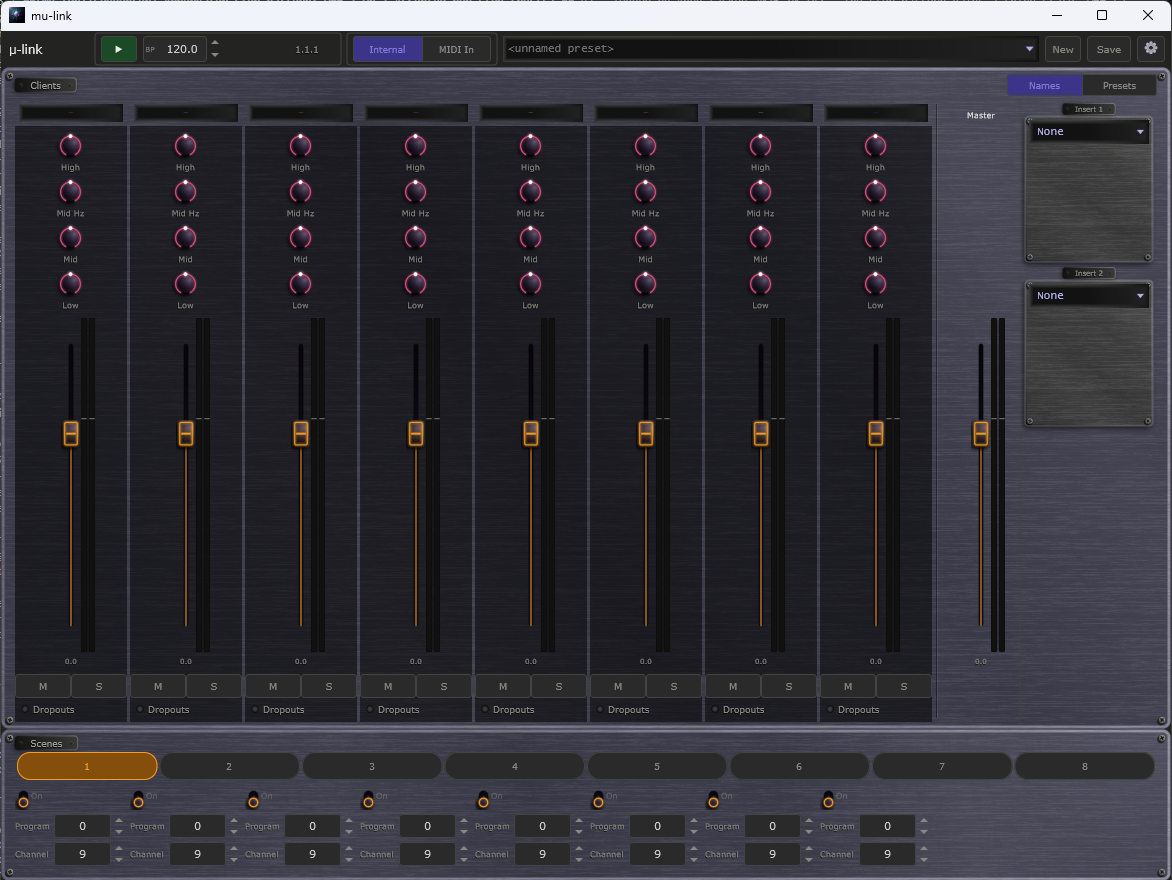
A strip for each connected app, up to eight. Each has a four-knob EQ, a fader, stereo meters, mute and solo. The master strip has two insert effects and a safety limiter, so the mix can never harshly clip your sound card.
Mixer
Eight scenes
Each scene sends a program change to your connected apps, so one click can switch presets across the whole rig. Set the program and MIDI channel for each scene and recall it live.
Scenes
External MIDI clock in and out
Slave the whole rig to a drum machine, groovebox or DAW, or send MIDI clock out to outboard gear. Start, Stop, Continue and song position are all handled, so everything starts together.
Sync
Connects by itself
Start μ-link and any μ-series standalone app, in either order. Within a second the app appears as a strip in the mixer. Quit μ-link and every app goes back to its own sound card and clock.
Setup
Tune the safety margin
Choose Low, Normal or High latency to suit your computer. A Dropouts lamp on each strip tells you if an app fell behind, so you know when to raise it.
Latency
μ-link window
Your rig on one screen.
The transport and clock source along the top, one strip for each connected app, the master and its inserts on the right, and the scenes underneath.
A typical setup
Three steps to a live rig.
Open μ-link
Choose your sound card on the Settings page. μ-link sets one sample rate and buffer size for everything.
Open your μ-series apps
Start μ-clid, μ-tant, μ-toni or μ-on as standalone apps. Each one says "μ-link connected" in its title bar.
Press Play and perform
Balance the strips, add a master effect and switch scenes. Everything runs in step on one output.
Standalone apps only. μ-link connects the standalone μ-series apps. Plug-ins running inside a DAW are never affected, because the DAW already owns the clock and the sound card there.
System requirements
System
Windows 10 or 11, 64-bit. macOS is on hold, and there is no Linux version yet.
Format
A desktop app that runs on its own. It has no VST3 or CLAP version, because it is not something you load into a DAW.
You will need
A sound card or audio interface, and one or more μ-series standalone apps to connect.
Download μ-link
μ-link is freeware. There is nothing to buy, no key and no support prompt. Download it and use it as long as you like.